- The Weekly Scoop w/ Chronos
- Posts
- #9 - Email Authentication
#9 - Email Authentication
No points for guessing what we’re gonna be talking about today (but if you guessed email authentication, here’s a virtual cookie!🍪)
You know how your brain tunes out when your loved ones repeat the same thing for the SEVENTH time?

Yeah, we know we’ve been on this topic for awhile now - and that’s because of the Gmail/Yahoo updates rolling out on the 1st of Feb.
SPF, DKIM, DMARC are words often thrown around, but what do they really mean?
That, along with email authentication (and BIMI) is what I’ll cover today, so you can gain a deeper appreciation on why it’s important, and how it impacts your brand.
Why Email Authentication?
When sending an email, providers like Gmail/Yahoo have to verify the email sender’s identity.
This protects both your brand, as well as your customers from malicious actors - scammers who email pretending to be you to extort people for money/info.
If you’re on Klaviyo’s Shared Sending Domain, SPF/DKIM are things you don’t have to care about, because Klaviyo has already got it sorted for you.
However, you might run into this:
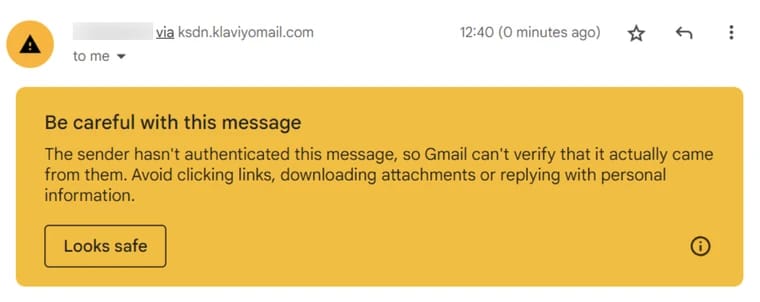
And, with the changes rolling out 1st Feb, this has become our #1 priority for our clients - getting them on a dedicated sending domain (comprehensive guide here).
Common Authentication Standards
1) Sender Policy Framework - SPF
Designed to detect forged sender addresses during the delivery of the email.
Helps the receiving mail server verify that emails coming from a specific domain were sent through an IP Address authorized by the domain’s administrators.
If the email has been sent through an IP address not allowed by SPF, then the email can be rejected or redirected away from the primary inbox
Without this, people can easily impersonate your brand via email.
2) DomainKeys Identified Mail - DKIM
Digital signature added to the header of your email to further verify the identity of the sender.
Email servers will verify that the DKIM signature header matches your domain name.
Unlike SPF, DKIM signature headers will stay with your email even when forwarded.
3) Domain-based Message Authentication, Reporting, and Conformance - DMARC
A protocol that uses both SPF and DKIM to determine the authenticity of the email.
Gives domain owners the ability to protect their domain from unauthorized use.
Gives instructions to email servers on how to receive the email.
Protects your brand from spoofing and limits your brand’s and recipients' exposure to potentially fraudulent and harmful messages.
Check if your DMARC is set up correctly here.
I’ve Setup All 3, Now What? (BIMI)
BIMI stands for brand indicators for message identification. It uses your DNS settings to authenticate your visual brand identity in emails you send, thus leading to:
Increased brand recognition
Legitimizing your business
Boosting deliverability
1) After confirming you have SPF/DKIM/DMARC set up, ensure that your DMARC policy is set to p=quarantine OR p=reject
2) Prepare your logo image, ensuring it meets BIMI’s logo criteria:
In SVG format
Image is square, with a centered logo and no additional text
Stored using HTTPS
No larger than 32kb
Trademark your logo and obtain a Verified Mark Certificate
And you’re all set for that sweet, sweet deliverability.
P.S. Included a checklist here for all the above steps (just make a copy)
And that’s a wrap!
Hopefully, I was able to shed a little more light into these commonly thrown around terms.
We don’t have much time left till Feb 1st, so do make sure to set your brand up for success, by swapping over to a dedicated sending domain.
And feel free to send any questions you might have, over my way.
Have a good weekend :)

Miles Malferrari